
Dashboards & Trackers
Make reviewing your marketing results part of a manageable routine. Sunset Media Studio’s dashboards and trackers help you organize information, compare performance, and keep your next steps in one place.
GA4 & Content Performance Dashboard
You have the numbers. Know what to do next.
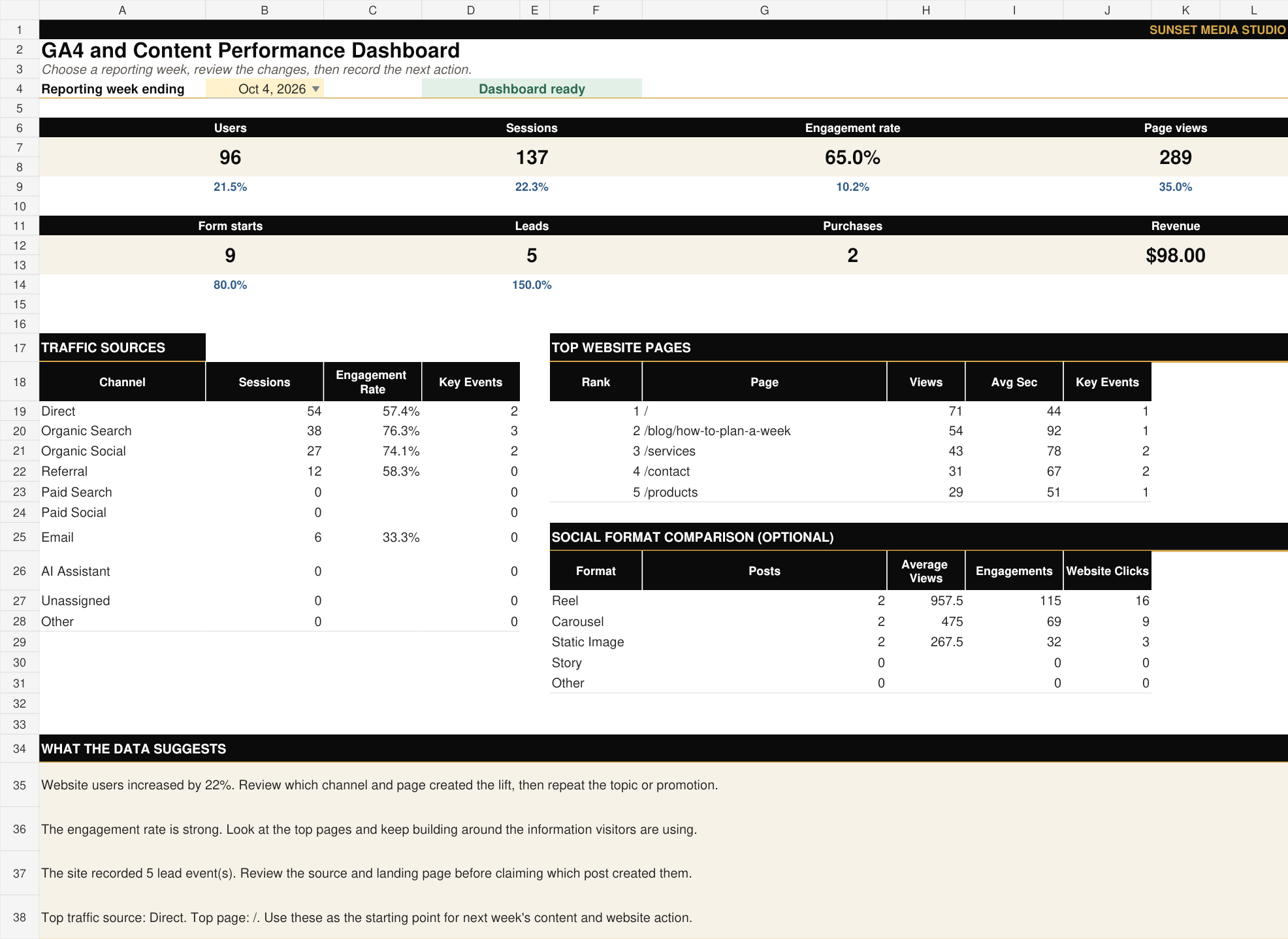
Organize your GA4 website reports and optional Facebook and Instagram post data in one workbook. Review weekly metrics, traffic sources, leading pages, and content formats, then record your next step in the Action Planner. Includes Excel and Google Sheets versions, a metric guide, and download and import instructions.
- Review website traffic, engagement, leads, and sales.
- Compare Facebook and Instagram content performance.
- Turn weekly findings into a practical next action.
- Includes Excel, Google Sheets, and step-by-step instructions.
Professional Performance Tracker
Make your next marketing decision easier.
Simplify your daily data gathering and establish a clear, heart-centered reporting habit that feels natural. Dive into our comprehensive product walkthroughs and easy-to-follow setup manuals to discover exactly how this supportive system can empower your growth.
- Keep your marketing results organized in one place.
- Track progress with a consistent reporting routine.
- Review past results to guide future planning.
- Includes an editable workbook and practical instructions.
GA4 & Content Dashboard
GA4 & Content Performance Dashboard

Organize your GA4 website reports and optional Facebook and Instagram post data in one workbook. Review weekly metrics, traffic sources, leading pages, and content formats, then record your next step in the Action Planner. Includes Excel and Google Sheets versions, a metric guide, and download and import instructions.
WHAT YOUR GA4 PERFORMANCE DASHBOARD HELPS YOU REVIEW
-
See how many people visit your website and how engaged they are.
-
Discover which traffic sources bring visitors to your site.
-
Review your leading pages, landing pages, and key actions.
-
Compare Facebook and Instagram content formats using your reported results.
-
Track weekly changes and record a practical next step in your Action Planner.
MADE FOR SMALL BUSINESS OWNERS
WHAT IS INCLUDED
A practical fit for owners who want to review their own marketing reports, connect social content with website activity, and make more informed decisions about what to improve next. The instructions explain what to enter and how to avoid common reporting mistakes.
-
An editable Excel workbook.
-
Access link to the Google Sheets version, which you can copy for your business.
-
A dashboard with weekly website metrics, comparisons, traffic sources, leading pages, social format comparisons and formula-based observations.
-
Setup fields for your business and primary conversion event.
-
Input tabs for weekly totals, traffic sources, user acquisition, landing pages, page performance, events and optional social content.
-
A weekly Action Planner.
-
Start Here instructions and a plain-language Metric Guide.
-
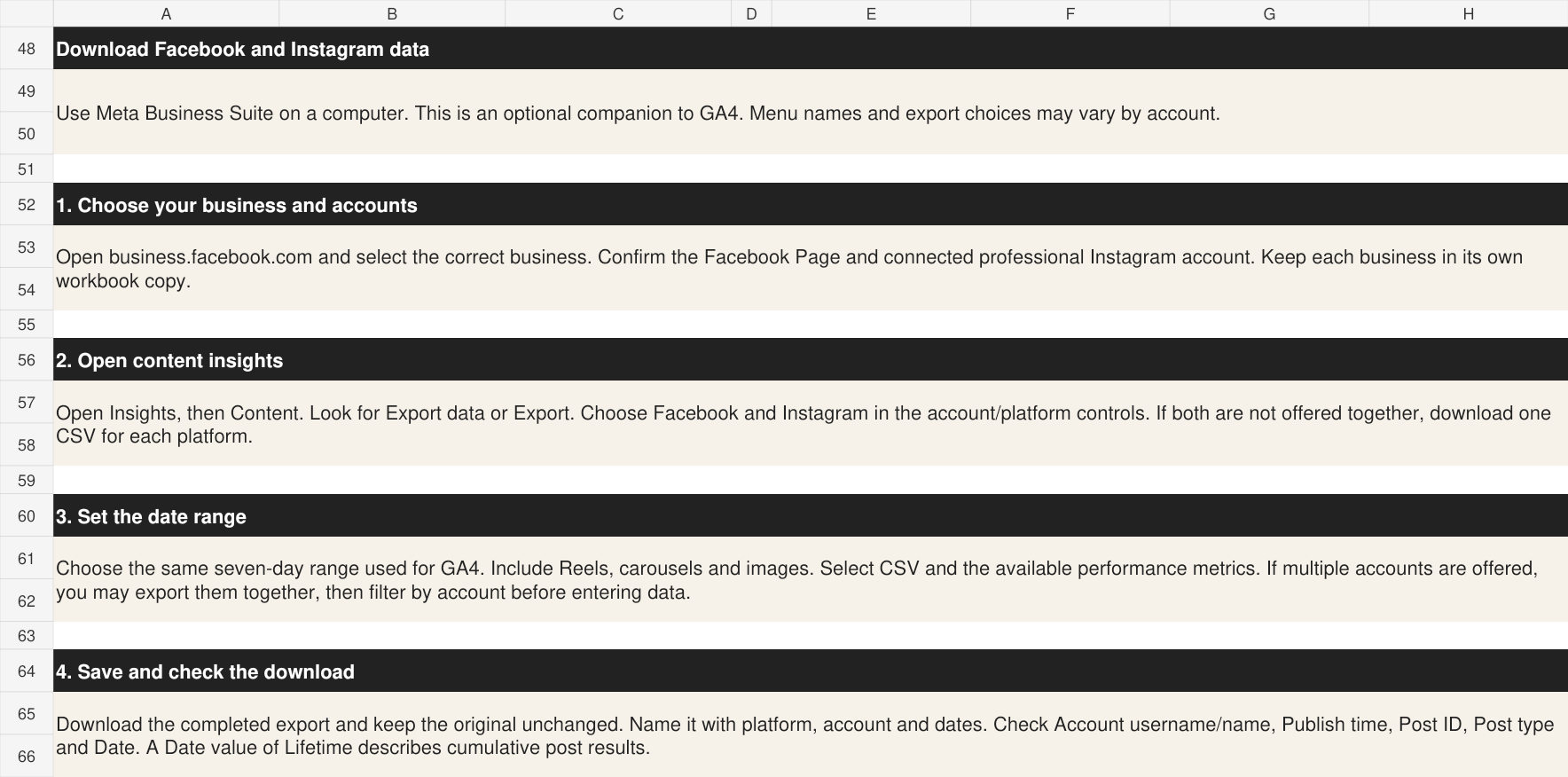
Facebook and Instagram export instructions, column mapping, duplicate prevention and lifetime-versus-weekly metric guidance.
-
Clearly labeled demonstration data so you can explore the workbook before entering your own results.
BEFORE YOU BEGIN
This is a downloadable spreadsheet product. You will enter or paste exported data yourself. It does not connect automatically to GA4 or Meta, and it does not configure website tracking. You will need access to your GA4 reports and Microsoft Excel or a Google account. Optional social reporting requires access to your Facebook or Instagram insights.
-
Save a working copy and complete Setup.
-
Download your GA4 reports for one consistent date range.
-
Enter values into the matching input tabs. Add Facebook and Instagram data if desired.
-
Select the reporting week on Dashboard.
-
Review your results and record one next action in Action Planner.
-
Repeat weekly to build a useful history.
HOW IT WORKS


Not sure how to get your data?
Book a one-time, 60-minute GA4 & Social Media Report Walkthrough with Donna White. Get personal guidance on finding and downloading your GA4, Facebook, and Instagram reports—so you can confidently repeat the process on your own.
Before You Begin: GA4 Must Be Active
Your website must have a Google tag installed and connected to your GA4 property to collect website data. GA4 begins collecting once tracking is working—it cannot recover activity from before installation.
Allow 24–48 hours for data to appear in standard reports. For a full weekly review, collect at least 7 days of data; for a monthly review, collect a full month.
Professional Automated Social Media Performance Tracker

$29.99
You are posting consistently—but do you know which type of content is actually helping your business?
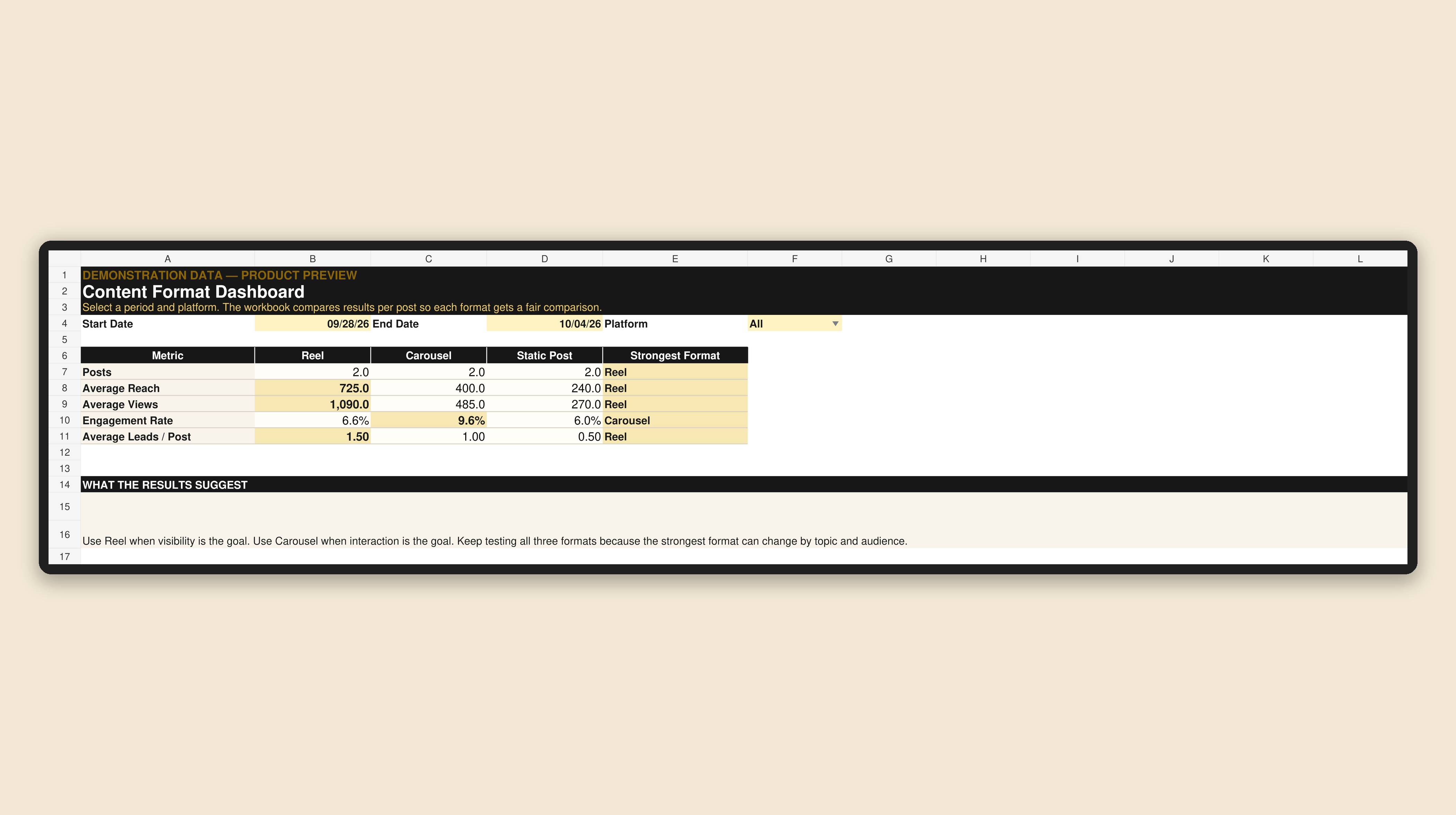
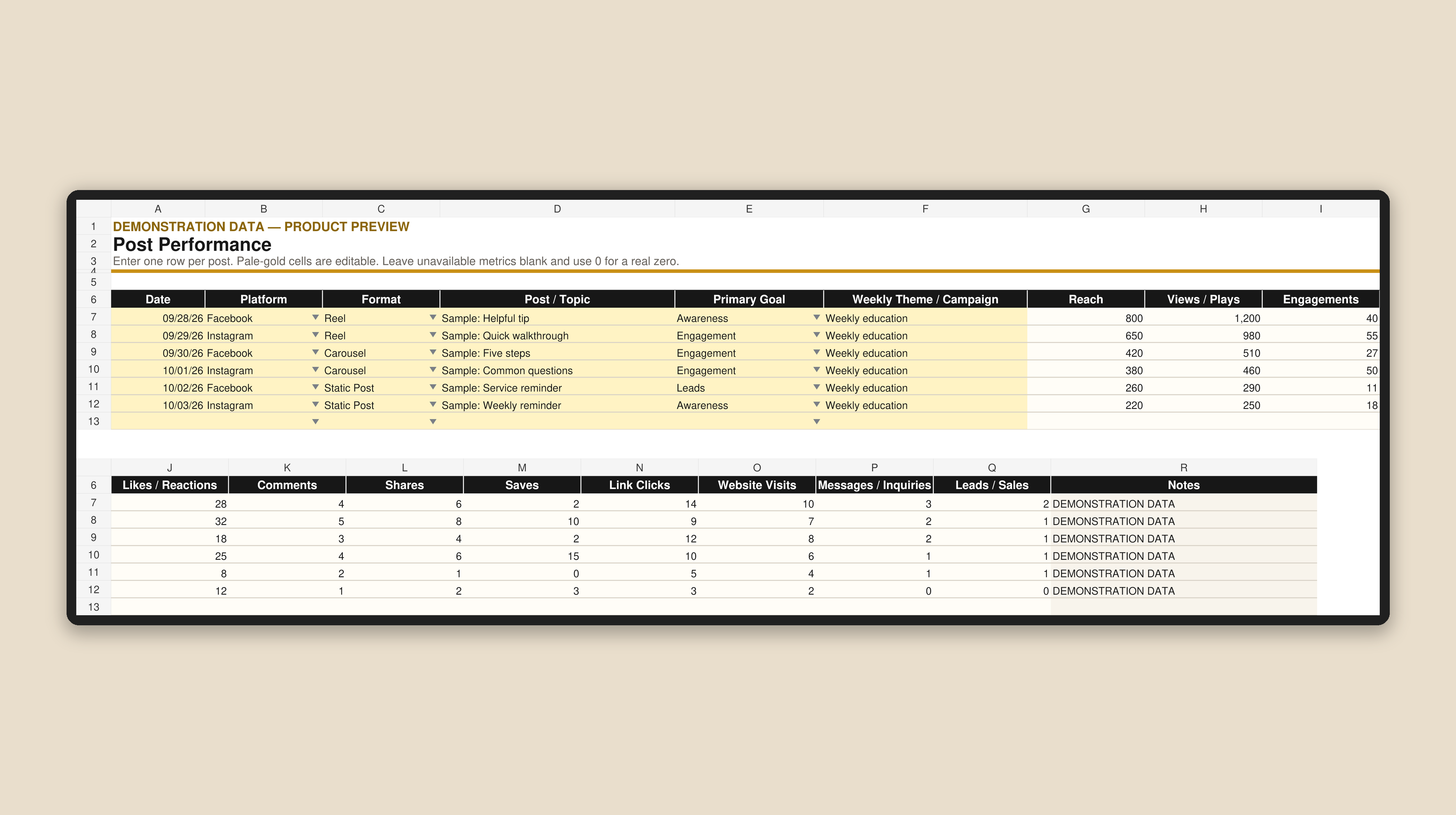
The Professional Automated Social Media Performance Tracker turns your weekly Facebook and Instagram results into information you can use. Add one row for each post, choose your reporting dates and let the workbook calculate the comparison.
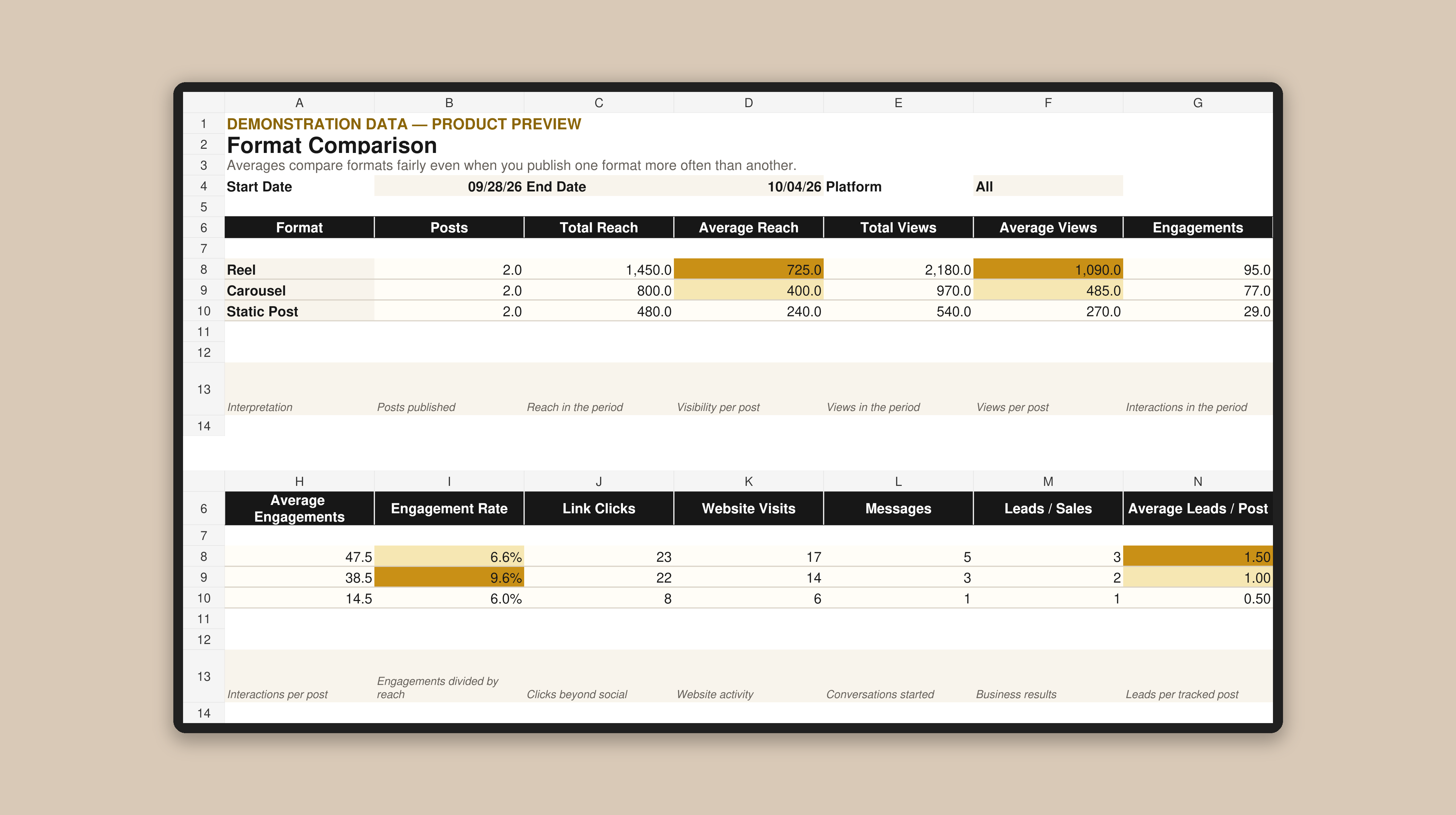
You will be able to see which content format is earning the strongest average reach, views, engagement rate and leads per post. The tracker also keeps link clicks, website visits, messages, inquiries and business results visible, so a high-view post does not automatically get mistaken for a post that moved someone closer to becoming a customer.
What the Tracker Helps You See
-
Whether Reels, carousels or static posts are creating the strongest visibility
-
Which format earns the highest engagement rate
-
Which posts move people to your website
-
Which format starts more messages and inquiries
-
Which content produces the most leads or sales per post
-
What the current results suggest you should test or publish more often
What is Included
-
Professional Microsoft Excel performance-tracking workbook
-
Clear Start Here guide
-
Space to track up to 500 individual posts
-
Facebook, Instagram and combined-platform views
-
Reels, carousel and static-post comparison
-
Automatic totals and averages per post
-
Automatic engagement-rate calculations
-
Automatic strongest-format results
-
Weekly planning recommendation based on the selected reporting period
How it Works
1. Choose a start date, end date and platform.
2. Enter or paste one row for each post.
3. Add the results available from Facebook or Instagram.
4. Review the automatic format comparison and dashboard.
5. Use the recommendation to help plan your next content week.
Who it is For
This tracker is designed for small-business owners, creators, freelancers and social media managers who want to understand their results without paying for another monthly analytics subscription.




COMPLETE SERIES BONUS
Purchase all four Shine Online Playbooks and receive the Professional Automated Social Media Performance Tracker at no additional cost—a $29.99 value.
The complete series includes:
• Social Media Strategy • Website Tips • Content Planning • Small Business Branding
This is a digital Microsoft Excel workbook. No physical product will be shipped.
The tracker does not connect directly to Meta, Facebook or Instagram. You enter or paste the results reported by the platforms, and the workbook updates the calculations and dashboard automatically.
Platform definitions can vary. For the most useful comparisons, enter the same type of metric consistently from week to week and leave unavailable results blank.
Not sure how to get your data?
Book a one-time, 60-minute GA4 & Social Media Report Walkthrough with Donna-the founder of Sunset Media Studio. Get personal guidance on finding and downloading your GA4, Facebook, and Instagram reports—so you can confidently repeat the process on your own.
Before You Begin: GA4 Must Be Active
Your website must have a Google tag installed and connected to your GA4 property to collect website data. GA4 begins collecting once tracking is working—it cannot recover activity from before installation.
Allow 24–48 hours for data to appear in standard reports. For a full weekly review, collect at least 7 days of data; for a monthly review, collect a full month.
Dashboards & Trackers FAQs
What’s the difference between the Dashboard and the Auto Tracker?
The GA4 & Content Performance Dashboard helps you review website activity and social content results together. The Auto Tracker focuses on individual Facebook and Instagram posts and compares Reels, carousels, and static posts.
Do these tools automatically connect to my accounts?
You enter your report data manually. Built-in formulas then calculate results and update the dashboard. Neither product automatically connects to GA4, Facebook, or Instagram.
What software do I need?
The GA4 & Content Performance Dashboard includes Excel and Google Sheets versions. The Auto Tracker is an Excel workbook. Check each product listing for the included formats before purchasing.
Do I need experience with analytics?
You don’t need advanced analytics knowledge. The included instructions explain how to get started, enter your information, and understand the main metrics.
Where do I get my data?
Website data comes from your Google Analytics 4 property. Facebook and Instagram results come from Meta Business Suite. The GA4 Dashboard includes report download instructions.
How often should I update my information?
A weekly routine is a practical starting point. Use consistent reporting periods so your comparisons are easier to understand.
Why might my social media numbers change later?
Posts can continue receiving views and interactions after publication. Some exported metrics show lifetime totals, so the same post may have higher numbers when you download a later report.
Can I use the Dashboard without GA4?
You can use its social content section, but website reporting requires data from an active GA4 property. Purchasing the Dashboard does not install GA4 on your website.
Is personal help available?
Yes. You can purchase a private, 60-minute online tutorial with Donna White. Choose the Dashboard + Tutorial bundle, or purchase the tutorial separately if you already have the Dashboard.
What does the tutorial cover?
We’ll walk through dashboard setup, entering reports, understanding key metrics, and choosing practical next steps for your business—with time for your questions.
How will I receive my purchase?
These are digital products. After checkout, use the download link provided to access your files. No physical product will be shipped.
Will these tools improve my results automatically?
They help you organize information and make more informed content decisions. Results depend on your strategy, implementation, audience, and other business factors.
Have other questions?
Still have questions? Check out our full FAQ Hub.