How Sunset Media Studio’s Digital Products Work Together

How Sunset Media Studio’s Digital Products Work Together
Small business owners rarely need another disconnected download. They need a practical way to move from “I know I should post” to a clear strategy, an organized plan, finished content, and useful results.
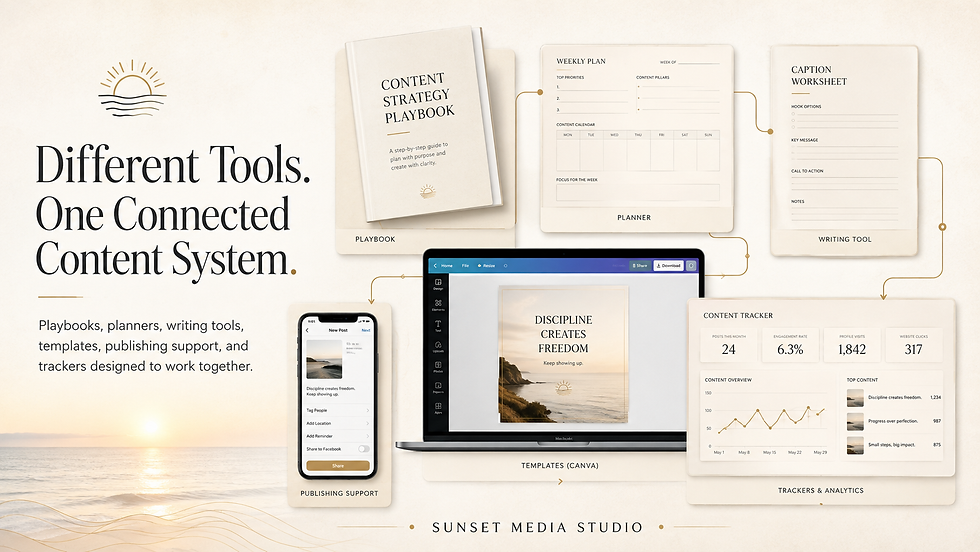
That is why the Sunset Media Studio product lines were designed to support one another. Each resource can solve a specific problem on its own, but together they form a connected workflow: understand the goal, plan the content, write the message, design the post, publish it, and review what happened.
|
The Playbooks Explain the Process
The Shine Online Playbooks are not more homework. Each one focuses on a specific part of a small business’s online presence, breaks the topic into manageable sections, provides examples and guided worksheets, and helps the reader decide what to do next.
A playbook creates the understanding behind the work. Once you know your audience, goals, content pillars, website priorities, or brand direction, the planning and production tools become much easier to use with purpose.
Planners Turn Decisions Into a Week You Can Use
A strategy only becomes useful when it changes what you do. Content calendars and planning pages help translate the decisions from a playbook or assessment into specific topics, formats, dates, and calls to action.
The goal is not to fill every blank square. It is to create a realistic sequence in which each post has a job and the week feels connected.

Writing Tools Help Finish the Message
Caption, hook, hashtag, and CTA resources solve a different problem: turning the plan into words. They help you choose an opening that earns attention, write a useful message, and give the reader one natural next step.
These tools work best after the strategy and topic are clear. A strong caption tool cannot decide what your business should accomplish, but it can make the writing stage faster once that decision has been made.
Templates Make the Plan Recognizable
Reusable design templates bring visual consistency to the system. They help a small business create Reels, carousels, Stories, and graphics without redesigning every post from the beginning.
The design should support the message. That is why templates come after the goal, topic, and format—not before them.
Trackers and Audits Close the Loop
Publishing is not the end of the process. A tracker, audit, or content library records what was posted and what happened next. Reach, views, saves, comments, clicks, inquiries, and website behavior provide evidence for the next plan.
The system becomes more useful over time because the next week does not begin with a guess. It begins with what your audience actually responded to.
One Customer Question Can Move Through the Whole System
Imagine that customers repeatedly ask, “How often should I post?” A playbook or strategy helps choose the angle. The planner places the idea in the week. A hook tool turns it into a Reel opening. The main steps become a carousel. A Story poll invites conversation. A blog explains the complete process. A CTA points the reader to the next helpful resource.
That is one useful idea doing several different jobs. The hook, depth, format, and CTA change, but the week still feels connected.
Where Should You Start?
· No clear direction: start with a strategy assessment or focused playbook.
· No usable plan: start with a content calendar or weekly planner.
· Writing takes too long: use caption, hook, hashtag, and CTA support.
· Design is inconsistent: begin with reusable custom templates.
· You do not know what worked: use a tracker or request an audit.

Different Tools. One Practical Process.
You do not have to purchase every resource at once. Begin with the problem causing the most friction, use that tool, and connect the next piece when your process is ready.
Explore the Shine Online Playbooks and Sunset Media Studio digital products to build a content system that supports the way your small business actually works.
Recommended Internal Links
· Shine Online Playbooks collection
· Digital Products store
· Free Social Media Audit
· Social Media Services page
· Related guide: turning one useful idea into multiple posts
Ready to Make Your Marketing Easier?
You do not have to create every post, caption, or marketing idea from scratch. Sunset Media Studio provides practical strategy, thoughtfully designed resources, and personalized support to help your business show up online consistently. I know what it feels like to sit down to do your social media and think, "What in the heck do I post about this week?" Now I run the Social Media and website campaigns for several businesses. Try my process...it really works.
Studio Pick of the Week:
The Shine Online Playbook Series makes marketing easier by breaking important topics into practical, manageable sections. Each playbook works alongside our content calendars, caption starters, hashtag and CTA resources, and customizable templates—helping you move naturally from strategy and planning to creating and publishing. Use each resource separately or combine them to build a complete, connected marketing system for your business.
Quick Links:


Comments